How to Translate SRT and VTT Subtitles: Timestamps, Bilingual Output & Privacy
On this page
- What the subtitle translator does
- Why you cannot translate subtitles like ordinary text
- How to translate subtitles, step by step
- SRT and VTT: what the subtitle translator preserves
- Translate subtitles bilingually, in one pass
- Subtitles are also supported in the file translator
- Working with no connection at all
- Limits and practical notes
A subtitle file looks like the easiest thing in the world to machine-translate: it is plain text, it is small, and half of it is numbers. Yet the results you get from a generic tool are often unusable — timings drift, sentences turn to nonsense, and the file has to be uploaded to a stranger's server first. This guide explains what actually goes wrong, how our subtitle translator solves each problem, and how to translate subtitles correctly in your own browser — with a tool that never uploads the file.
What the subtitle translator does
The subtitle translator is built for one job: take an SRT or VTT subtitle file in and produce a translated subtitle file out, with every timing intact and every sentence grammatically complete. Here is what it handles:
- Batch translation: drop up to 20 files at once. They are processed sequentially to keep memory low, and you can download them individually or as a single ZIP archive.
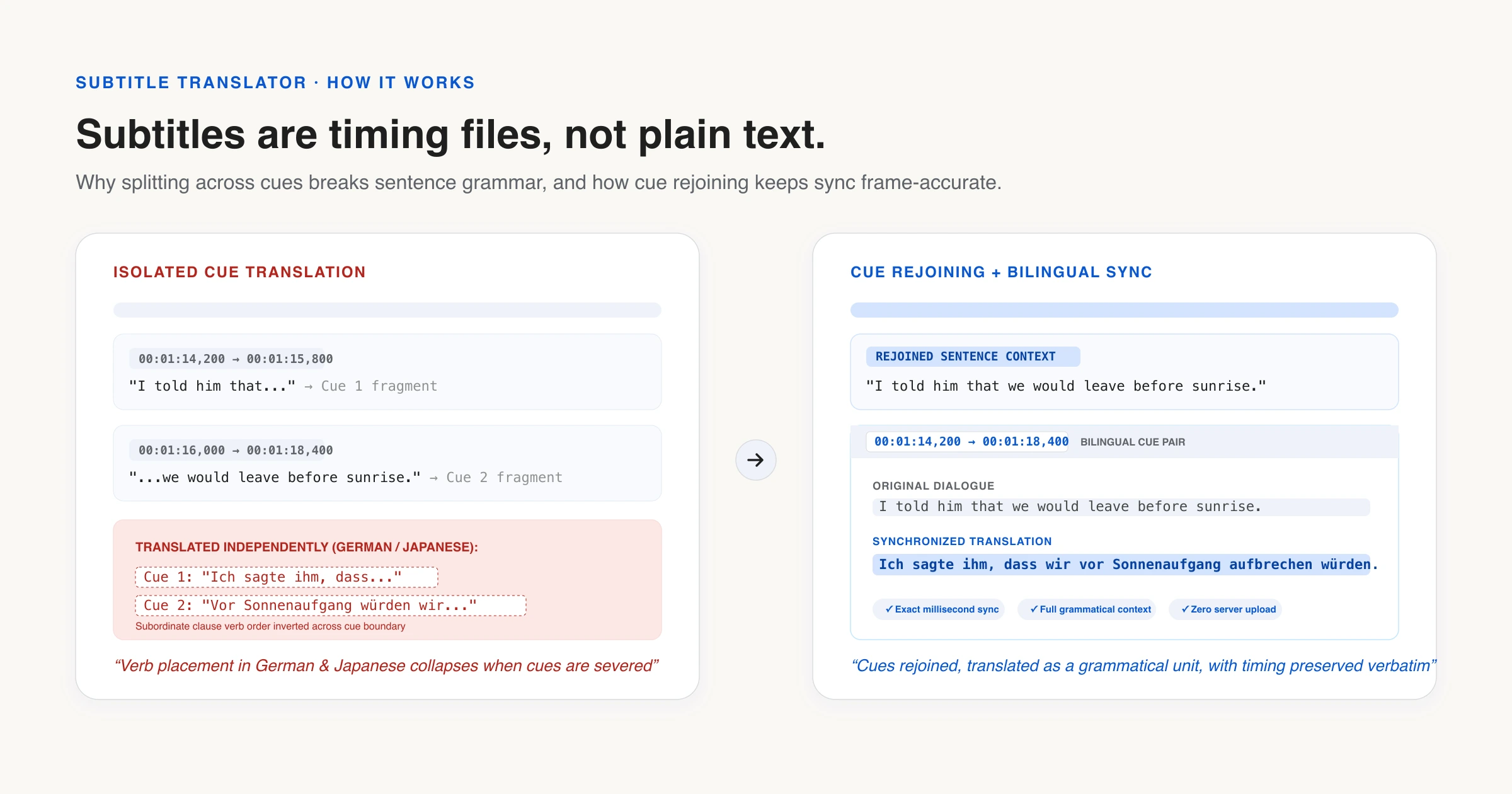
- Sentence rejoining: subtitles routinely split one sentence across two or three cues. The translator detects continuations and merges them before translating, so the AI model sees complete grammar instead of fragments.
- Bilingual output: enable one toggle and every cue shows the translation above the original line — perfect for language learners watching a film, or reviewers checking a machine translation against its source.
- Frame-accurate timestamps: time codes are never recalculated or reformatted. The original millisecond tokens copy straight through to the output.
- Completely offline: once a language pair's model has been downloaded and cached, the entire flow works with no internet at all. The model lives in your browser's cache, the page itself is cached by a service worker, and the File API that reads your subtitle file has never needed a network.
- Zero-upload privacy: the file never leaves your device. There is no upload endpoint — the on-device AI model runs inside your browser tab.
Why you cannot translate subtitles like ordinary text
An SRT or WebVTT file is a timing document that happens to contain dialogue. Every cue carries a start time, an end time and one or two short lines that must be readable in the two seconds they are on screen. Any tool that treats it as a wall of text will damage one of those three things.
1. Timestamps that drift
The most common failure is silent: a tool parses the time codes into numbers, translates the dialogue, then writes the times back in its own format. Milliseconds get rounded, comma separators become dots, and a file that was frame-accurate is now subtly out of sync. A subtitle translator should never recompute a time code it did not need to touch — the original tokens should be copied straight through to the output, which is what happens when you translate SRT files here.
2. Sentences cut in half
Subtitles routinely split one sentence across two or three cues, because that is how long a viewer can read at a time:
“I told him” … “that we would leave” … “before sunrise.”
Translate those three fragments separately and each one loses the grammar of the others. In languages where word order or verb position differs from English — German, Japanese, Turkish — the result is not merely awkward, it is wrong. The subtitle translator detects cues that continue one sentence, translates them as a unit, and shows the result as a single cue that spans the same time range. This rejoining logic runs by default when you translate subtitles in SRT and VTT files, and it can be switched off when you need the output cue-for-cue identical.
3. Your file on someone else's server
Subtitles for an unaired episode are among the most leak-sensitive files in the media industry, and a court transcript or a corporate training video is no different. Uploading them to a free web tool means handing a copy to a third party. A local subtitle translator removes the question entirely: there is no upload endpoint to trust, because the model runs inside your browser tab.
How to translate subtitles, step by step
- Open the subtitle translator and add your .srt or .vtt files — drop them onto the page, or use Choose files, which is what a phone or a keyboard wants. They are parsed immediately, in memory, on your device.
- Choose the target language. The source language is detected from the dialogue itself, so you can leave it on automatic.
- Press Translate. The first time you use a language pair, a compact neural model (roughly 110 MB) is downloaded once and cached. Every later run — including with the network switched off — needs no download at all.
- Download the translated file, or use “Download all” to get a batch as a single ZIP archive.
Because the work happens in a Web Worker, the page stays responsive while a feature-length file runs, and progress is saved to your browser as it goes. Close the tab by accident halfway through and you will be offered the chance to resume rather than start over.
SRT and VTT: what the subtitle translator preserves
| Element | SRT | WebVTT |
|---|---|---|
| Time codes | Copied verbatim | Copied verbatim |
| Cue numbering | Renumbered sequentially | Original identifiers kept |
| Cue settings (align, position) | n/a | Preserved |
| Header and NOTE blocks | n/a | Passed through untouched |
| Multi-line cue text | Joined, then translated as one line | Joined, then translated as one line |
Translate subtitles bilingually, in one pass
Turning on bilingual output as you translate subtitles writes the translation and the original line into the same cue, which most players show as a two-line subtitle. For language learners this is the single most useful setting on the page: you read the line you are learning, with the meaning underneath, at the pace of the film. Reviewers use it differently — as a way to check a machine translation against its source without juggling two files.
Subtitles are also supported in the file translator
If you work with mixed file types — subtitles alongside Markdown docs, CSV spreadsheets, or JSON localization catalogues — the file translator handles SRT and VTT files with the same timestamp preservation and sentence rejoining logic, plus batch support for other text-based formats. Use the dedicated subtitle translator when subtitles are your only concern; use the file translator when they are part of a larger batch.
Working with no connection at all
Once a language pair has been prepared, the whole flow works offline. The model lives in your browser's cache, the page itself is cached by a service worker, and the File API that reads your subtitle file has never needed a network. Prepare the pairs you expect to need while you have Wi-Fi, and you can translate SRT and VTT files on a plane, on a train, or in an edit suite with no internet access at all — a scenario covered in more detail in translating without an internet connection.
Limits and practical notes
Honesty is part of the product. Here are the things worth knowing before you translate subtitles:
- Idiomatic dialogue: the models that fit in a browser are small, so a subtitle translator running locally will not match a large cloud model on wordplay, slang or heavily idiomatic dialogue — it is a strong first pass, and for many languages a perfectly watchable one, but a human still improves it.
- Mixed-language files: files that mix languages within cues get translated as though they were all in the source language you selected. If your subtitles alternate between two languages, split them first.
- Speaker labels and annotations: speaker labels (like “[John]:”) or on-screen sign descriptions inside cues are treated like any other text and will be translated. Remove them beforehand if they should stay in the original language.
- Very long files: a full feature film (2,000+ cues) translates fine but takes several minutes on typical hardware. Progress is tracked per-cue, and the UI stays responsive because translation runs in a background Web Worker.
- Encoding: the subtitle translator reads files as UTF-8. If your file uses a legacy encoding (like Windows-1252 or Shift_JIS), re-save it as UTF-8 first to avoid garbled characters in the output.
What you gain in exchange is the part no cloud tool can offer: when you translate subtitles here, the files stay on your machine, there is no quota to run out of, and it keeps working when the connection does not.
References & further reading
- 01WebVTT: The Web Video Text Tracks Format — W3Cwww.w3.org/TR/webvtt1/
- 02WebVTT and the <track> element — MDN Web Docsdeveloper.mozilla.org/en-US/docs/Web/API/WebVTT_API
- 03Opus-MT: open translation models by Helsinki-NLPgithub.com/Helsinki-NLP/Opus-MT
- 04File API — MDN Web Docsdeveloper.mozilla.org/en-US/docs/Web/API/File_API
Translate your subtitles
Translate SRT and VTT subtitle files locally in your browser with frame-accurate timestamps and zero uploads.
Open the subtitle translator