How to Translate Long Text
To translate a long text with LangsAny, paste it into the text translator and translate one page at a time, or open the original file in a dedicated tool. There is no daily translation quota or account requirement. The text tool processes up to 5,000 characters per request; file tools process smaller text blocks and have device-dependent file-size limits.
Does “no limit” mean any amount of text at once?
No. A daily quota, a per-request character limit and your device’s memory are different limits. LangsAny has no daily service quota, but that does not mean an entire book fits into one translation request. Long input is divided into pages in the text tool. Moving to the next page does not translate it automatically: review and translate each page before copying the combined result.
For a document or book, use the original file rather than copying everything into the text box. A format-aware tool can keep paragraph boundaries, chapters or subtitle timing while translating the text. File size, available memory, language support and processing time still matter.
Choose the tool for your source
- TXT or Markdown translator: for an article or notes saved as a text file. Download the translated file instead of copying separate pages.
- Word, Excel and PowerPoint translator: for DOCX, XLSX and PPTX files. Keep an original copy and inspect the exported layout.
- EPUB book translator: for DRM-free books. Choose translation-only or bilingual output with original and translated paragraphs.
- PDF translator: for reading a PDF alongside its translation. Scanned pages require OCR; check the recognised text before trusting the translation.
- SRT and VTT translator: for existing subtitle text with timestamps. Translating a subtitle file is a different task from transcribing a recording.
Translate a long article step by step
- Keep a source copy. Save the article as TXT or Markdown, retaining paragraph breaks. Remove navigation text or unrelated material copied with it.
- Open the file translator. Select the file, choose the source language and target language, and check that the file is accepted.
- Approve the model download if needed. The first use of a language pair may need an internet connection and a large download. The prompt shows an estimate when the model size is known.
- Translate and review. Keep the tab open while the task runs. Check names, numbers, terminology and a few paragraphs from different parts of the article.
- Download the output. Open it separately and check the final paragraph as well as the beginning. A partial translation should not be mistaken for a finished document.
Try a complete book workflow before your own file
The bilingual EPUB walkthrough includes a small Spanish source book and an actual Spanish-to-English export. Download both, compare the paragraphs, and inspect the documented translation errors. It is a way to judge the output before committing a whole book, not a promise of identical wording or quality for every language pair.
What if preparation or translation does not finish?
- Model download fails: stay online for the first run, check whether your network permits the model host, then retry. An uncached model cannot work offline.
- Automatic language detection stalls or is wrong: choose the source language explicitly, especially for short or mixed-language text.
- Language pair is unsupported: choose a supported pair. Some pairs use English as an intermediate language, which can change nuance.
- A large file exceeds the device’s capacity: try a smaller document or a device with more available memory. A book with many images can be large even when it contains little text.
- The output is incomplete: check task status and remaining sections before exporting. Keep the source file so you can retry.
Can long-text translation work offline?
Yes, after the required model and application resources are available on your device. While online, open the tool and complete a small translation in the language pair you plan to use. Then disconnect and try another short passage before relying on it for a trip. Clearing browser storage or eviction of cached resources can mean downloading again. See the offline setup guide.
Does the text leave my device?
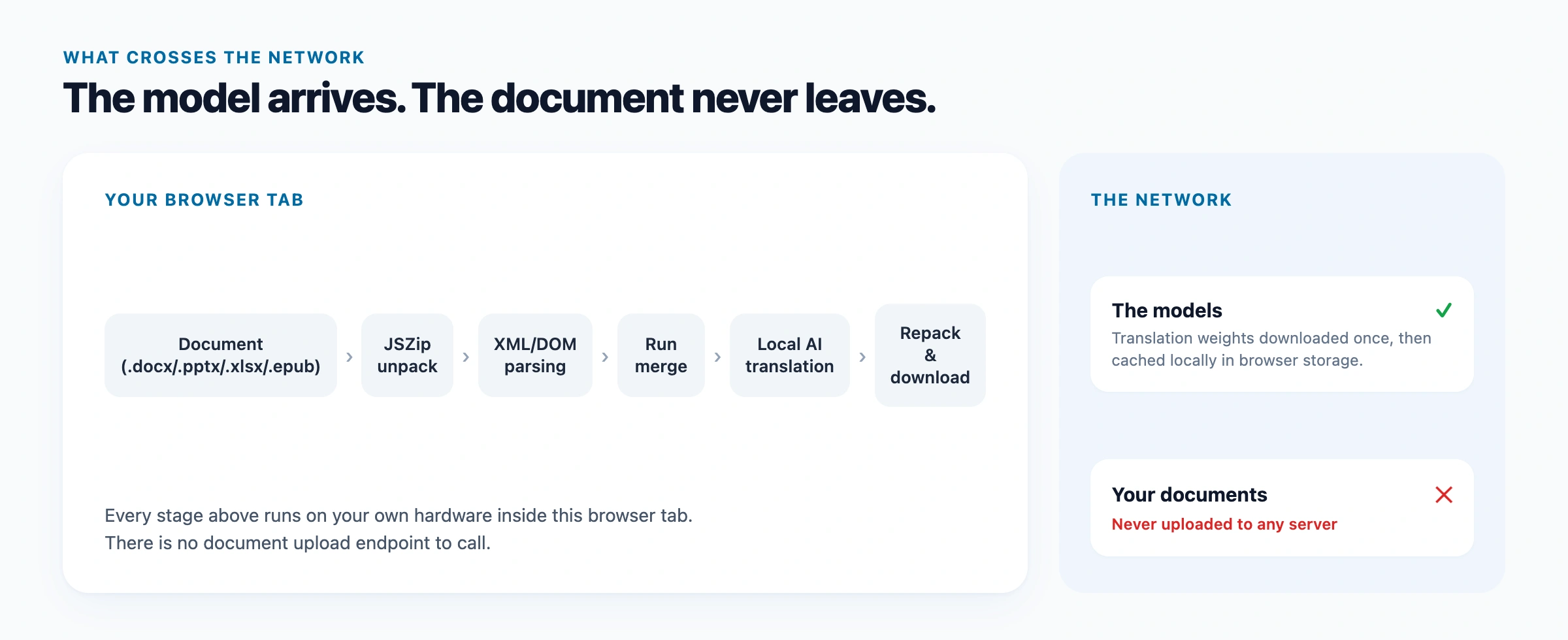
The text translator and the file tools linked here process content locally. Model downloads and site analytics still involve network requests, but translation content is not included in analytics. The separate legacy JSON translator uses a server API; choose JSON in the local file translator if you need on-device processing. The privacy policy explains that distinction.
Local machine translation is a reading aid. Review important wording against the source, and have official or high-stakes documents checked by a qualified translator.
Translate your text file
Open a TXT or Markdown file and translate it on your device.
Open file translator