How Document Translation Works: Word, PowerPoint, Excel & EPUB in Your Browser
On this page
- Modern Document Translation Workspace Features
- The Technical Architecture: Every Format Is an Archive
- EPUB Translation: Books Are Archives Too
- The Trap: A Sentence Is Not Stored as a Sentence
- The Merge → Translate → Write-Back Pipeline
- Important Nuances, Precautions & Practical Details
- Simpler Formats? Use the File Translator
- Why On-Device Translation Is the Privacy Mandate
Rename a Word document from quarterly-report.docx to quarterly-report.zip and open it. Inside is a structured directory of XML files, media assets, relationship schemas, and manifests. Nothing proprietary, nothing binary — just markup in an archive.
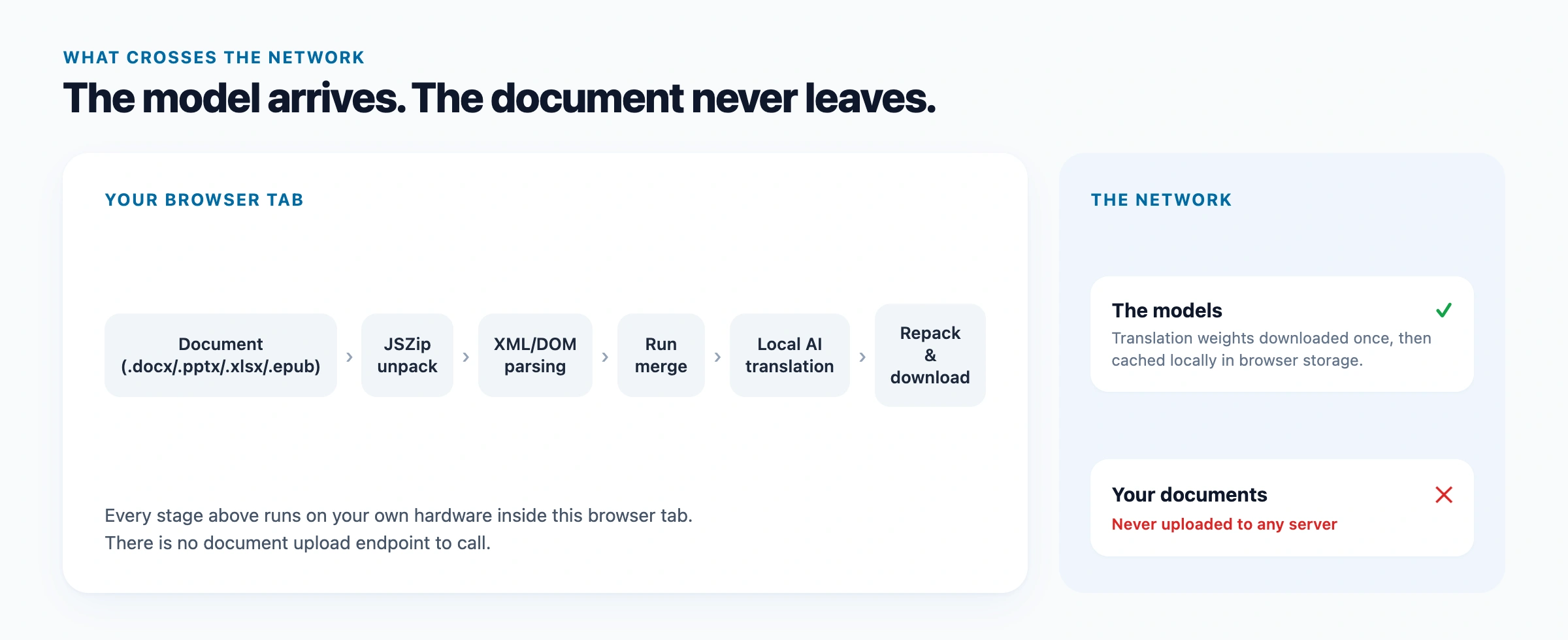
That single architectural fact is why document translation can take place entirely inside a modern browser tab without sending a single byte to an external cloud server. The document translator and the dedicated EPUB translator both exploit this: they unzip the archive locally, translate the text with on-device AI, and repack a downloadable file — all in your browser. But while unzipping an archive in JavaScript is straightforward, rebuilding a translated document that preserves styles, tables, and layouts involves navigating a subtle structural trap inherent in how word processors serialize text.
Modern Document Translation Workspace Features
Building a truly usable in-browser document translator requires more than a bare conversion script. Users work with diverse document formats, multiple files, and different target language requirements. The document translator provides a production-grade batch workspace designed around high efficiency and strict privacy:
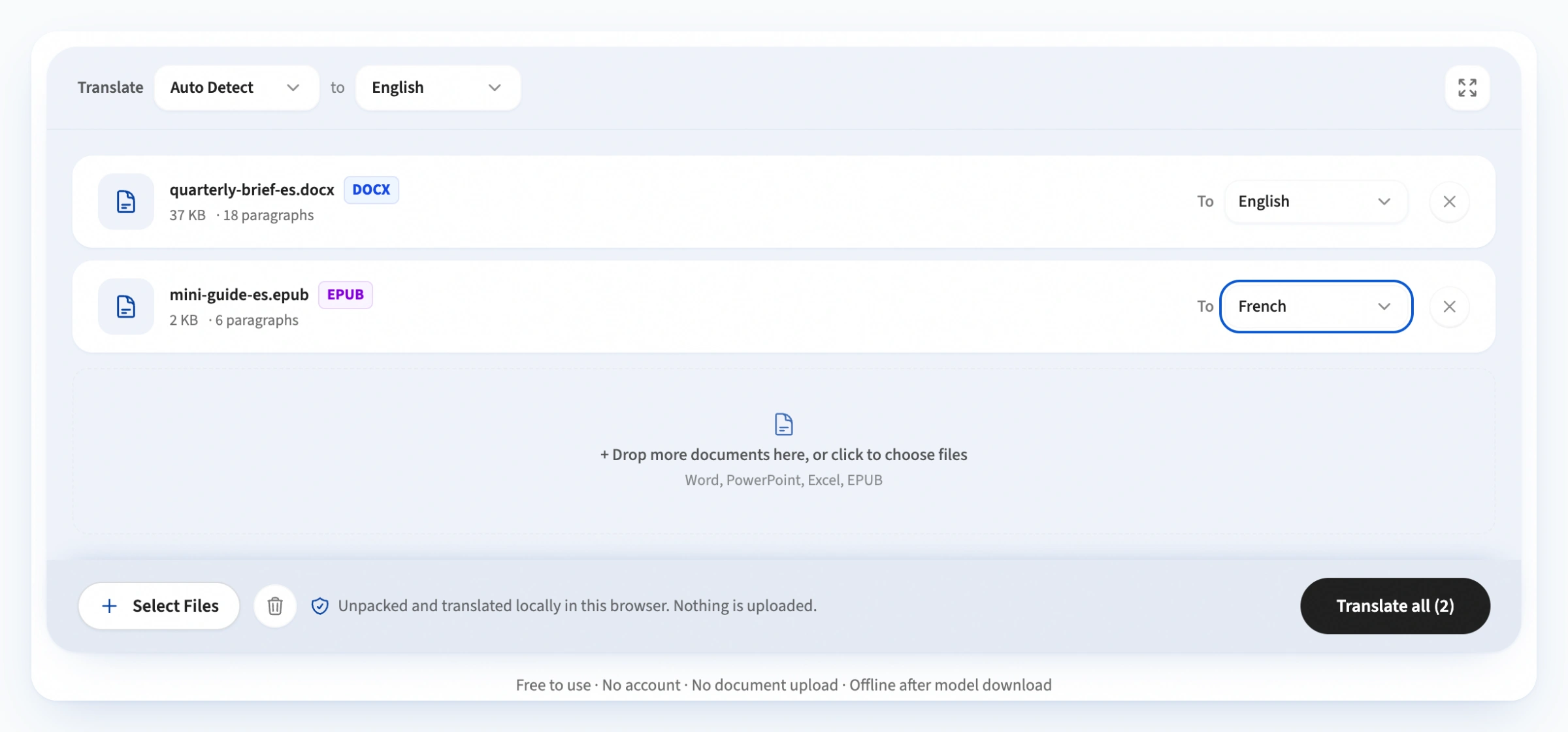
- Multi-File Batch Queue: stage Word (
.docx), PowerPoint (.pptx), Excel (.xlsx), and EPUB (.epub) documents together in a unified queue. The parser immediately reads the archive header to display file sizes, detected paragraph counts, and format badges without uploading data. - Dual-Tier Target Language Controls: set a global target language at the top control bar to update all staged files simultaneously, or fine-tune individual rows with dedicated dropdowns (for example, translating a Word contract to Spanish while translating an accompanying slide deck to French in the same batch session).
- Distraction-Free Fullscreen Mode: expand the translation workspace to full viewport height to manage large document queues and inspect multi-file batches comfortably.
- Sticky Action Floor Bar: access batch actions from any scroll depth. Includes one-click queue clearing with undo toast protection, real-time stage progress indicators, individual file downloads, and full batch export as a
.ziparchive. - Zero-Upload Privacy by Architecture: opening, parsing, neural translation, and archive rebuilding execute locally using WebAssembly and WebGPU inside your browser. No document ever leaves your device.
The Technical Architecture: Every Format Is an Archive
Since 2007, Microsoft Office files have adhered to the Office Open XML (ECMA-376) standard. An Office document is an Open Packaging Conventions (OPC) zip container enclosing XML parts, media files, and relationship definitions. Similarly, EPUB 3.3 files are Open Container Format (OCF) zip archives containing XHTML chapters and CSS stylesheets.
| Format | Internal Text Locations | Formatting Storage |
|---|---|---|
| .docx (Word) | word/document.xml, plus header*.xml, footer*.xml, and footnotes.xml | Run properties (<w:rPr>) inside paragraphs (<w:p>) |
| .pptx (PowerPoint) | ppt/slides/slide*.xml and ppt/notesSlides/notesSlide*.xml | DrawingML text bodies (<p:txBody>) and shape trees |
| .xlsx (Excel) | xl/sharedStrings.xml referenced by xl/worksheets/sheet*.xml | Cell format references pointing to xl/styles.xml |
| .epub (Books) | XHTML chapter documents declared in OEBPS/content.opf | Standard CSS classes, semantic HTML tags, and inline styles |
Using modern browser APIs and client-side libraries like JSZip, a web application can read, mutate, and rebuild these archives entirely in JavaScript. Legacy binary formats (such as .doc, .ppt, and .xls) rely on proprietary binary stream layouts that cannot be safely parsed client-side without enormous native binaries; users must save them in modern XML formats first.
EPUB Translation: Books Are Archives Too
An EPUB file is essentially a zip containing XHTML chapters, a CSS stylesheet, and a manifest (content.opf) that declares the reading order. The EPUB translator walks each chapter file, extracts translatable text from block-level HTML elements (paragraphs, headings, list items, table cells), translates them as complete sentences, and writes the result back into the markup — preserving the chapter structure, table of contents, cover art, embedded fonts, and all CSS styles.
Translating a whole book is a long operation: a 300-page novel contains tens of thousands of sentences, and on-device inference processes them sequentially. Progress is displayed chapter by chapter, and already-translated chapters are preserved even if you pause or close the tab. The rebuilt .epub opens cleanly in Apple Books, Calibre, Kobo, and any standards-compliant e-reader.
The Trap: A Sentence Is Not Stored as a Sentence
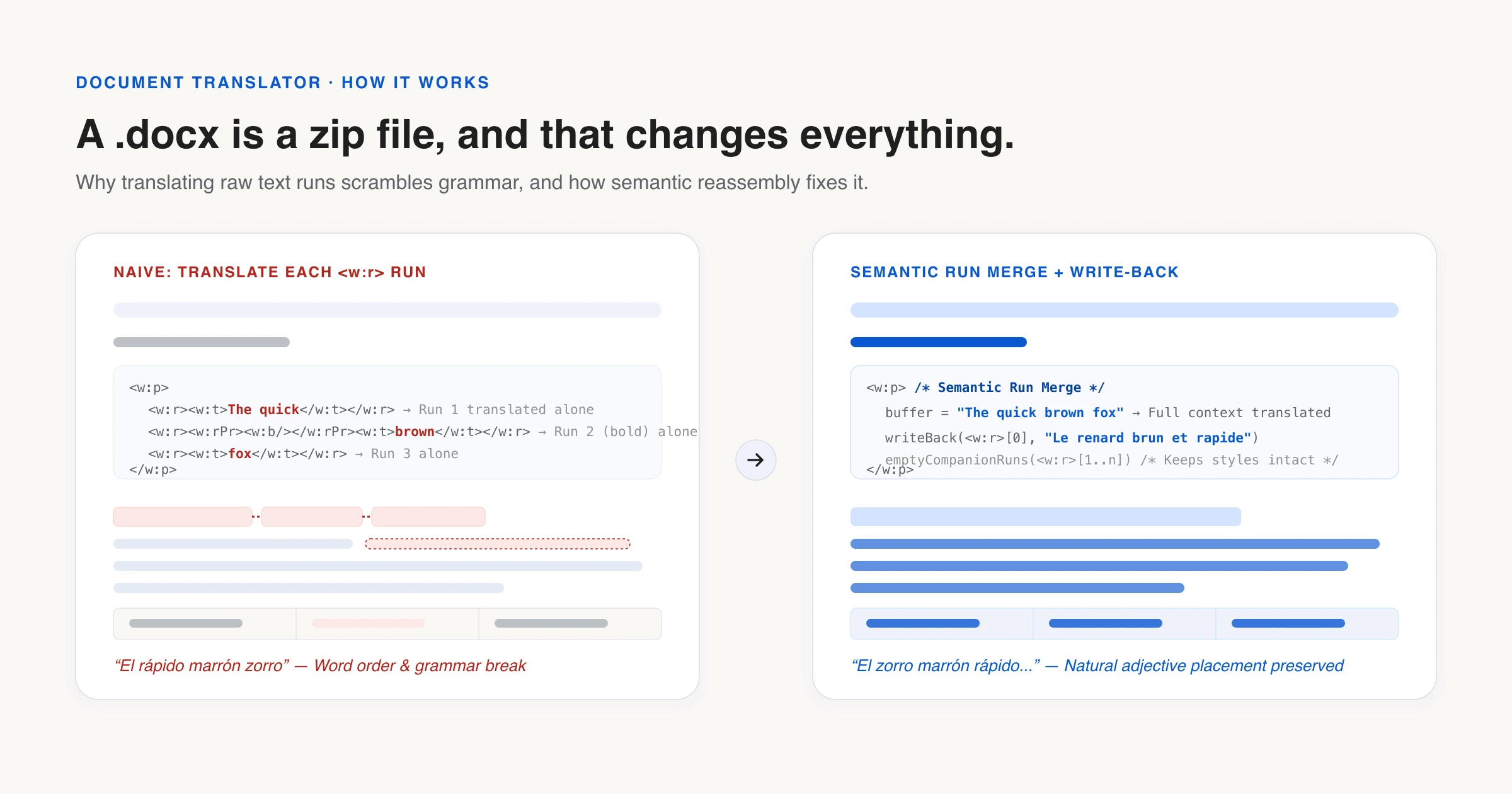
The fundamental pitfall of document translation lies in how word processors serialize styled text. When an author types a sentence containing formatting — such as “The quick brown fox” where the word “brown” is bold — Word does not store a single string with style markers. Instead, it breaks the paragraph into multiple runs (<w:r>):
<w:p>
  <w:r><w:t xml:space="preserve">The quick </w:t></w:r>
  <w:r><w:rPr><w:b/></w:rPr><w:t>brown</w:t></w:r>
  <w:r><w:t xml:space="preserve"> fox</w:t></w:r>
</w:p>
Word introduces a new run whenever formatting changes — and frequently when nothing changed at all. Spell-check markers, revision tracking, IME composition events, and typing pauses often cause Word to split an ordinary sentence into four, six, or ten disjointed runs.
A naive document translator walks the DOM and translates each <w:t> element individually. It sends “The quick ”, then “brown”, then “ fox” to the model as three separate inference calls. Because grammatical structure, word order, and adjective placement vary drastically across languages (for example, in Spanish or French, the adjective “brown” follows the noun “fox”), translating fragments in isolation yields incomprehensible, scrambled phrasing that no translation model can repair.
The Merge → Translate → Write-Back Pipeline
To preserve linguistic fluency while maintaining file integrity, our engine implements a three-step reconstruction pipeline:
- Semantic Run Merge: The parser iterates over every paragraph element (
<w:p>in Word,<a:p>in PowerPoint,<si>in Excel shared strings, and block-level tags in EPUB). It collects all text runs into a single continuous sentence buffer, joining fragmented runs and preserving spaces. - On-Device Neural Translation: The merged paragraph is dispatched to a local translation model running inside a Dedicated Web Worker via Transformers.js. The model receives complete sentence context, allowing it to reorder words, apply correct gender and case agreements, and output natural phrasing.
- Surgical Write-Back: The engine injects the translated string into the paragraph's leading text run (
<w:t>) with an explicitxml:space="preserve"attribute, and empties all subsequent companion runs while preserving their enclosing structural tags.
Because all XML tags, relationship identifiers, theme definitions, and relationship maps remain intact, the reconstructed archive matches the original document structure down to the byte level. When opened in Microsoft Office or LibreOffice, the file renders seamlessly without corruption warnings.
Important Nuances, Precautions & Practical Details
While the Merge → Translate → Write-Back protocol guarantees grammatically fluent output and valid archives, client-side document translation involves several practical tradeoffs and technical constraints:
1. The Inline Formatting Tradeoff
When multiple runs inside a sentence are merged, any mid-sentence formatting variance (such as an individual italicized word or a single bold term) collapses into the styling of the leading run. While retaining individual bold tags would seem appealing, preserving run boundaries forces fragment-by-fragment translation, destroying sentence grammar. A grammatically correct sentence rendered in uniform weight consistently outperforms a broken, unreadable sentence with misplaced bold tokens.
Crucially, all macro-level structural formatting — paragraph styles, headings, bullet lists, table borders, cell backgrounds, embedded graphics, custom fonts, and slide positions — survives 100% intact, as it lives outside text run elements.
2. Browser Memory Footprint & Archive Expansion
Unpacking a compressed document archive in browser memory causes significant data expansion. A heavily formatted 20 MB PowerPoint deck or a dense Excel workbook can expand into 150–250 MB of raw XML DOM nodes and string tables.
To prevent mobile browsers and memory-constrained laptops from terminating the tab, the batch queue parses and translates files sequentially rather than concurrently, releasing intermediate XML trees from memory as each document completes.
3. Text Expansion and Visual Overflow
Most European languages (such as German, Spanish, French, and Portuguese) require 15% to 25% more characters and syllables than English to express equivalent meaning. In Word documents and EPUB books, additional text reflows onto subsequent lines and pages naturally.
However, in PowerPoint presentations and fixed-dimension Excel worksheets, text boxes often have rigid bounding rectangles. When translating from concise English into longer target languages, authors should review slide layouts post-translation to adjust font sizes or widen text frames where necessary.
4. Right-to-Left (RTL) Script Direction
When translating into bidirectional languages like Arabic or Hebrew, paragraph flow must be mirrored. The write-back engine flags RTL text segments and injects appropriate bidirectional markers (such as <w:bidi/> in Word OpenXML or dir="rtl" in EPUB XHTML) to ensure punctuation and numerals align correctly in office editors.
5. Rasterized Text Inside Images
Document translation operates strictly on structured XML text streams. If a Word document or presentation contains screenshots, scanned diagrams, or flattened infographics with rasterized text baked into pixels, that text is invisible to the document parser. Users should extract such images and process them separately with an OCR-based image translation tool if the embedded text needs translating.
6. Legacy Formats and File Size Guidelines
Only modern XML-based formats are supported: .docx, .pptx, .xlsx, and .epub. Older binary formats (.doc, .ppt, .xls) must be saved in the modern format first — a “Save As” in Microsoft Office or LibreOffice is all it takes. For file sizes, the document translator suggests a comfortable limit based on your device's available memory; documents under 15 MB typically translate without any issues on modern hardware.
Simpler Formats? Use the File Translator
Not every translatable file is an Office document or an e-book. For lighter text-based formats — Markdown (.md), plain text (.txt), CSV spreadsheets (.csv), and JSON localization catalogues (.json) — the file translator handles them with the same local AI engine and batch support, preserving code fences, table syntax, and JSON structure while translating only the prose.
Why On-Device Translation Is the Privacy Mandate
Consider the documents that professionals and individuals most frequently need translated: non-disclosure agreements, employment contracts, board presentations, patent filings, financial statements, and confidential manuscripts. These are precisely the sensitive assets that organizations forbid uploading to public cloud APIs and free web utilities.
When unpacking, neural inference, and file repacking all occur inside the browser tab, security shifts from a legal policy to an architectural guarantee. There is no remote upload endpoint to trust, no data retention schedule to inspect, and zero exposure to external interception. You can open your browser's DevTools Network panel, disconnect your internet connection once the model weights are cached, and verify that the translation runs completely offline.
Experience on-device document translation on the document translator, or translate books with the EPUB translator.
References & further reading
- 01Office Open XML — ECMA-376 standardecma-international.org/publications-and-standards/standards/ecma-376/
- 02EPUB 3.3 — W3C Recommendationwww.w3.org/TR/epub-33/
- 03JSZip — create, read and edit .zip files in JavaScriptstuk.github.io/jszip/
- 04Opus-MT: open translation models by Helsinki-NLPgithub.com/Helsinki-NLP/Opus-MT
Translate documents locally
Batch translate Word, PowerPoint, Excel, and EPUB files while preserving formatting and styles.
Open the document translator