Why Free Text to Speech Tools Cannot Give You a File
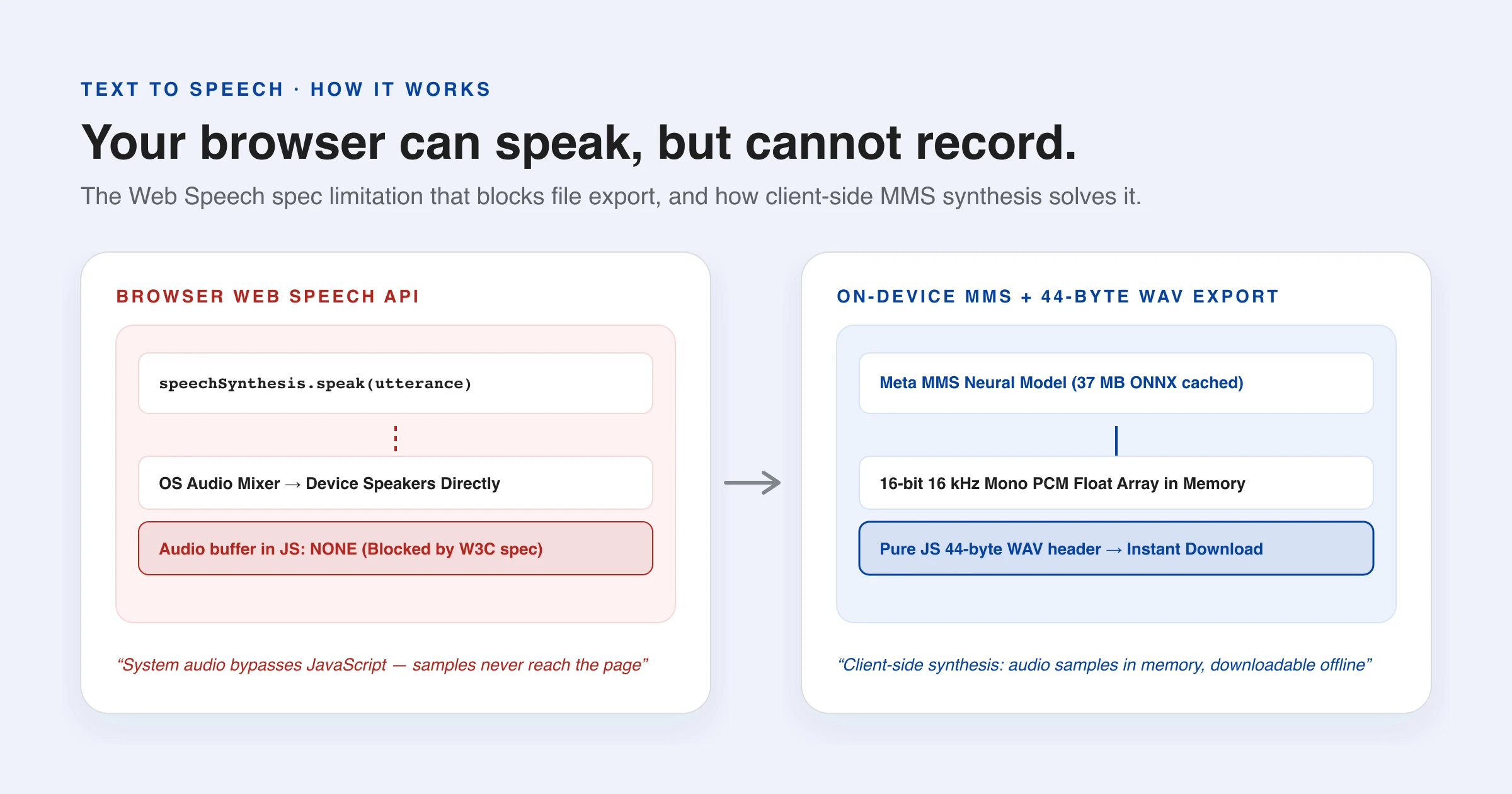
Here is a small mystery. Every browser on every device has been able to speak out loud for a decade — no download, no account, no API key. Yet almost every free text to speech site either makes you sign up to save the audio, or does not offer a download at all. Why?
The answer is one sentence in a web standard, and it explains the shape of every browser-based speech tool you have ever used.
Your browser already has voices
The Web Speech API has been in browsers since around 2014. Three lines of JavaScript and the machine talks:
speechSynthesis.speak(
  new SpeechSynthesisUtterance("Hello there")
)
Those voices (invoked through SpeechSynthesis) come from the operating system, not the browser — the same ones a screen reader uses. Which means browser text to speech inherits whatever your OS has installed, and that is a lot: Windows, macOS, Android and iOS all ship voices for dozens of languages, including Chinese, Japanese, Korean, Arabic and Russian. No model anyone could reasonably download to a web page competes with that coverage.
It is genuinely free, genuinely private — the text is handed to the operating system, not to a server — and genuinely unlimited. So far, so good.
The one thing it cannot do
Now try to save the audio.
You cannot. The API plays sound through the system directly and never hands the samples to the page. There is no buffer to read, no stream to tap, no callback carrying audio data. The spec simply does not expose it, in any browser.
People try to route around this. Capturing the tab with getDisplayMedia and recording, hoping the system audio leaks into a microphone stream, replaying at high speed — all of it is either blocked, requires the user to grant screen recording to save a sentence, or produces a recording of the room. There is no clean path.
So any site offering a downloadable file is doing one of exactly two things:
- Sending your text to a server to be synthesised there, and sending the file back. This is what the overwhelming majority do. It is also why they have accounts, character quotas and pricing pages — every request costs them money.
- Running a real speech model inside the page, where the audio exists in memory as an array of numbers and can be written to a file.
Once you know that, the whole category makes sense. The character limits on free text to speech tools are not stinginess; they are the shape of a per-request server bill.
What a WAV file actually is
The second option sounds harder than it is, because the output format is trivial. A WAV file is a 44-byte header followed by the raw numbers:
"RIFF" ....  "WAVE"
"fmt "  16  format=1(PCM) channels=1 rate=16000 bits=16
"data"  <length>  <sample> <sample> <sample> ...
That is the entire specification you need. No encoder, no library, no dependency — just write the header and then each float sample scaled to a 16-bit integer. MP3 or Opus would mean shipping a codec to compress a file the user is about to open immediately, which is a poor trade.
The model producing those samples here is MMS (Massively Multilingual Speech), Meta's research project, converted to ONNX and run through the same Transformers.js the rest of this site uses — so it costs no new dependency. About 37 MB per language, downloaded once and cached.
Two tiers, and why neither is “the good one”
It is tempting to present this as a quality ladder: free system voice, better paid model. That is not the real distinction, and pretending otherwise would be dishonest.
| Your device's voice | Downloaded model | |
|---|---|---|
| Cost | Nothing | ~37 MB once |
| Languages | Whatever your OS has — usually dozens | Nine |
| Quality | Often excellent | Comparable, sometimes worse |
| Save to a file | Impossible | Yes |
| Consistency | Varies by device | Identical everywhere |
A modern system voice frequently sounds better than a 37 MB model, because your operating system shipped a much larger one. The downloadable tier is not there to beat it. It is there because it is the only way to produce a file without uploading your text to somebody — and because it sounds the same on a five-year-old Linux laptop as on a new Mac.
Which is why the default here is your own device's voice, and the model is opt-in. Asking someone to download 37 MB to hear one sentence, when their machine can already say it for free, would be the wrong default.
Checking before offering
One detail worth copying if you build this yourself: getVoices() can return an empty list. Chrome populates it asynchronously, so the first call is often empty and you have to wait for the voiceschanged event. And some systems — a stripped-down Linux container, for instance — have the API present with no voices installed at all.
Both cases produce a button that does nothing when pressed, which is the worst possible outcome. The fix is to probe first and simply not render the control when the device has no voice for that language. That is why a read-aloud icon appears next to some translated text on this site and not others: it is your operating system telling you what it can say.
Try it
The text to speech page has both tiers side by side — press Speak with your device's voice, then switch to the downloadable one and compare. Open DevTools while you do it. With the system voice there is no network traffic at all, because the text never leaves the tab; with the model, you will see it download once and never again.
Free text to speech that also gives you the file is not impossible. It just cannot be done with the API everyone reaches for first.
References & further reading
- 01Web Speech API — MDN Web Docsdeveloper.mozilla.org/en-US/docs/Web/API/Web_Speech_API
- 02SpeechSynthesis — MDN Web Docsdeveloper.mozilla.org/en-US/docs/Web/API/SpeechSynthesis
- 03MMS: Scaling Speech Technology to 1000+ languages — Meta AIai.meta.com/blog/multilingual-model-speech-recognition/
- 04Transformers.js — run AI models in the browserhuggingface.co/docs/transformers.js
Try browser text to speech
Natural speech synthesis right in your browser with instant playback and zero setup.
Open text to speech