How a Local PDF Translator Works (and Why Layout Breaks)
On this page
- The In-Browser Translation Architecture
- The Core Challenge: Geometry vs. Semantic Structure
- Layout Reconstruction: The Four-Pass Algorithm
- Non-Translatable Entity Protection
- Dual-Engine Translation & Watchdog Scheduling
- Typographic Expansion & Auto-Fitting
- Reader Modes & Verification Interaction
- Export Strategy: Canvas Composite vs. Font Subsetting
- Operational Boundaries & Precautions
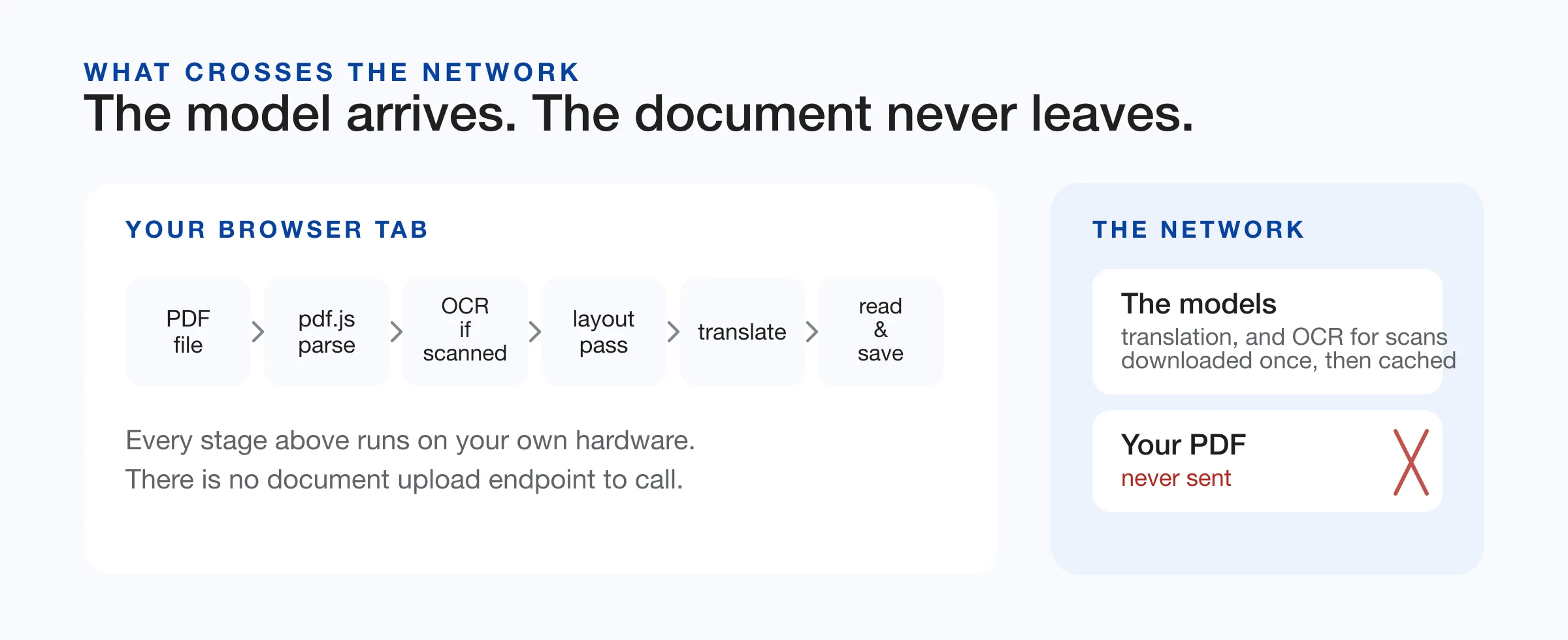
A browser-based PDF translator provides private, on-device document translation without uploading files to remote servers. When you need to translate PDF documents securely, processing runs entirely within the client tab: extracting text layers, rebuilding fractured layouts, executing neural machine translation, and rendering bilingual reading views or exportable files. Once models are cached, all processing operates completely offline.
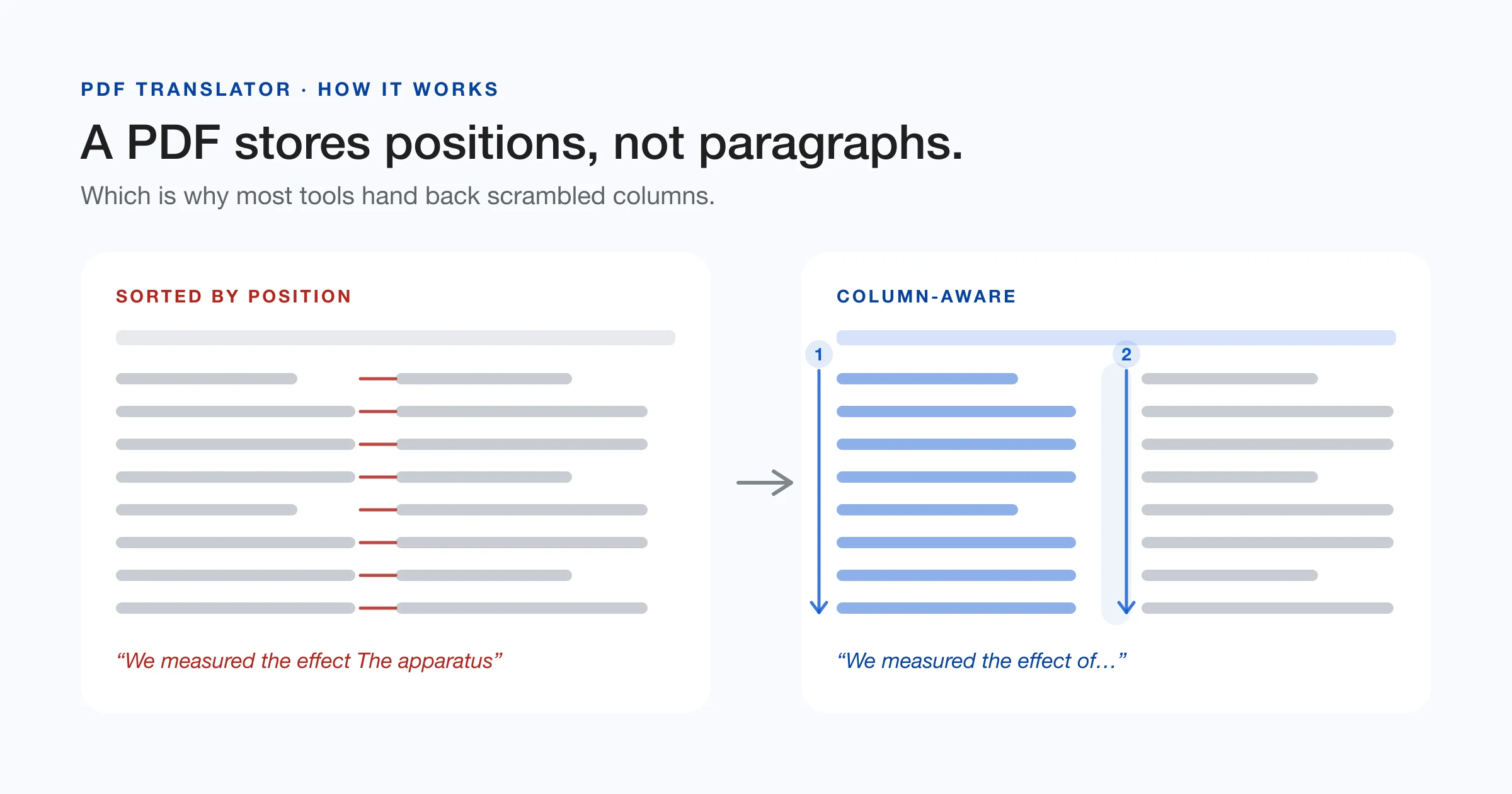
The primary technical challenge in PDF translation is not the translation model itself, but the structural reconstruction preceding it. Unlike word processors, PDF documents (governed by the ISO 32000-1 standard) do not store paragraphs, tables, or reading flow; they store isolated visual glyph instructions. The core engineering of a local PDF translator centers on transforming disjointed coordinates into coherent sentences without server assistance, combining geometry analysis, computer vision, and client-side neural inference.
The In-Browser Translation Architecture
When a user submits documents to translate PDF files, the internal engine of the PDF translator executes six sequential stages directly on local hardware:
- Document Parsing & Queue Management: Mozilla's PDF.js initializes the document inside a Dedicated Web Worker. Multi-file queues are processed sequentially rather than concurrently, capping peak memory usage to prevent browser tab termination on memory-constrained devices.
- Scanned Page Detection & On-Device OCR: The parser measures text density. If a page contains fewer than 40 characters, it is classified as a raster scan. The page is rendered to a canvas bitmap at 200 DPI and processed through a WebAssembly build of Tesseract OCR ( Tesseract.js) to synthesize a coordinate-aware text layer.
- Geometric Layout Reconstruction: Raw glyph runs are merged into lines, structural grids are extracted as data tables, and multi-column layouts are separated via recursive XY-cut algorithms to establish an accurate semantic reading order before any PDF translation starts.
- Entity Protection & Dual-Engine Translation: Non-translatable tokens—mathematical formulas, citation markers, URLs, and code identifiers—are masked with synthetic placeholders. The text is dispatched to Chrome's Built-in AI or an on-device ONNX/WASM neural model.
- Typographic Auto-Fitting: Translated blocks calculate linguistic expansion ratios and iteratively rescale font sizes via binary search to fill original bounding boxes without clipping or collision.
- Structured Export & Provenance: The reader renders three interactive views and outputs structured Markdown, plain text, or an overlaid PDF container embedded with machine translation provenance metadata.
The Core Challenge: Geometry vs. Semantic Structure
Standard word-processing formats (DOCX, HTML, EPUB) store semantic trees consisting of headings, paragraphs, tables, and lists. In contrast, the PDF specification (ISO 32000-1) is a page-description language designed for visual fidelity. Content streams contain low-level graphic operators (BT for begin text, Tm for coordinate matrix transformations, and Tj for glyph painting).
When users attempt to translate PDF files using standard text tools, the output often breaks into jumbled snippets. A single printed sentence often arrives from PDF.js as multiple disconnected glyph fragments, each with individual coordinate vectors. A robust PDF translator must infer paragraph flow and reading order from visual coordinates alone. Naive text extraction introduces critical structural failures that compromise PDF translation:
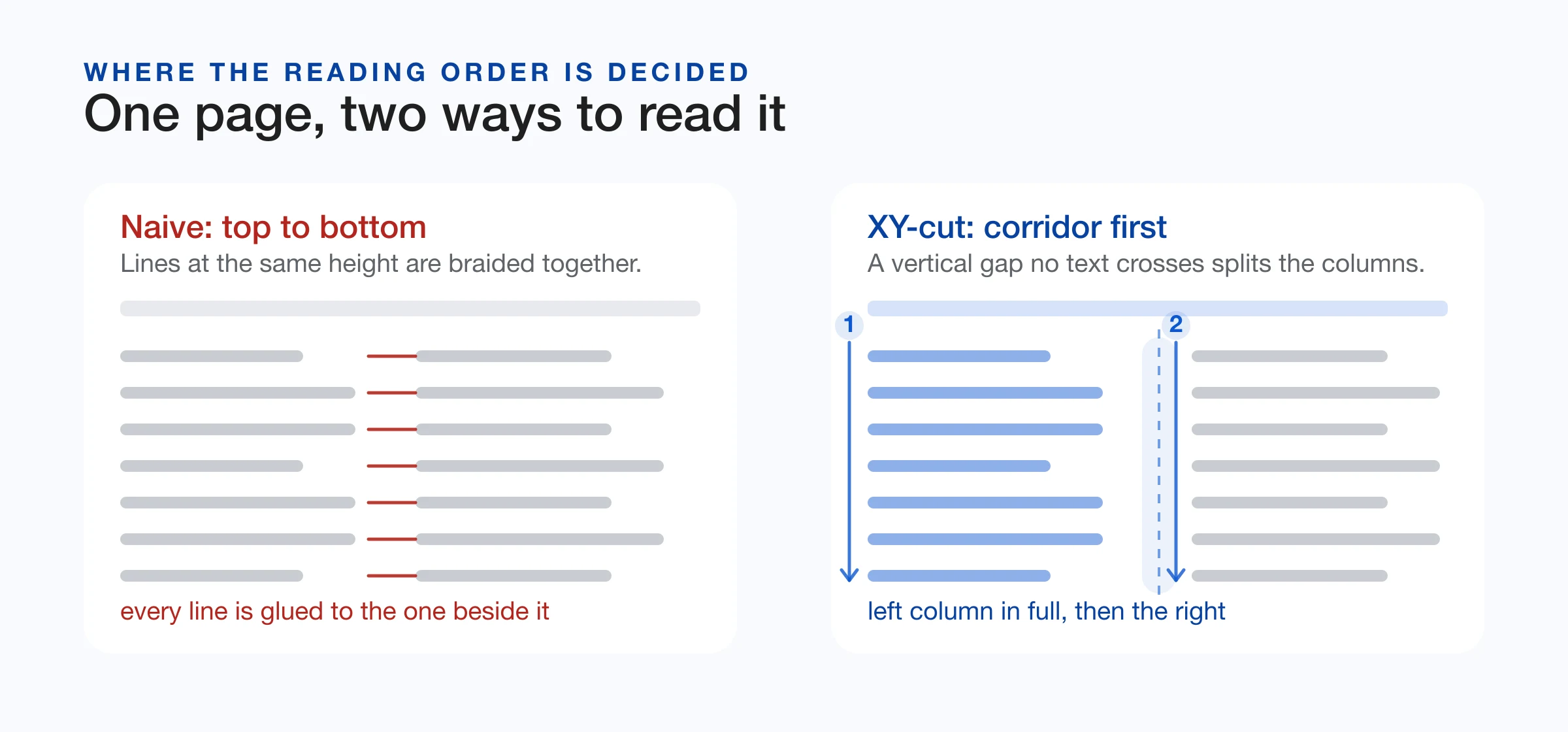
- Gutter Braiding: In multi-column layouts, lines across separate columns frequently share identical vertical baselines. Sorting strictly by Y-coordinates braids disparate sentences together across the gutter, generating unintelligible inputs for the translation model.
- Sentence Fragmentation: Translating hard-wrapped visual lines in isolation truncates grammatical clauses. Because syntax and word order vary widely across language pairs, fragmented translation produces unnatural and incorrect phrasing.
- Table Disintegration: The whitespace separating document columns resembles the whitespace between table cells. Standard column slicers dissect multi-column tables into detached vertical ribbons, permanently dissociating column headers from numeric rows.
- Omission of Raster Scans: Digitized paper documents lack digital text layers. Without integrated client-side OCR detection, any attempt to translate PDF scans yields blank pages.
Layout Reconstruction: The Four-Pass Algorithm
To accurately translate PDF pages containing complex multi-column typography, the reconstruction pipeline processes glyph data through four geometric passes:
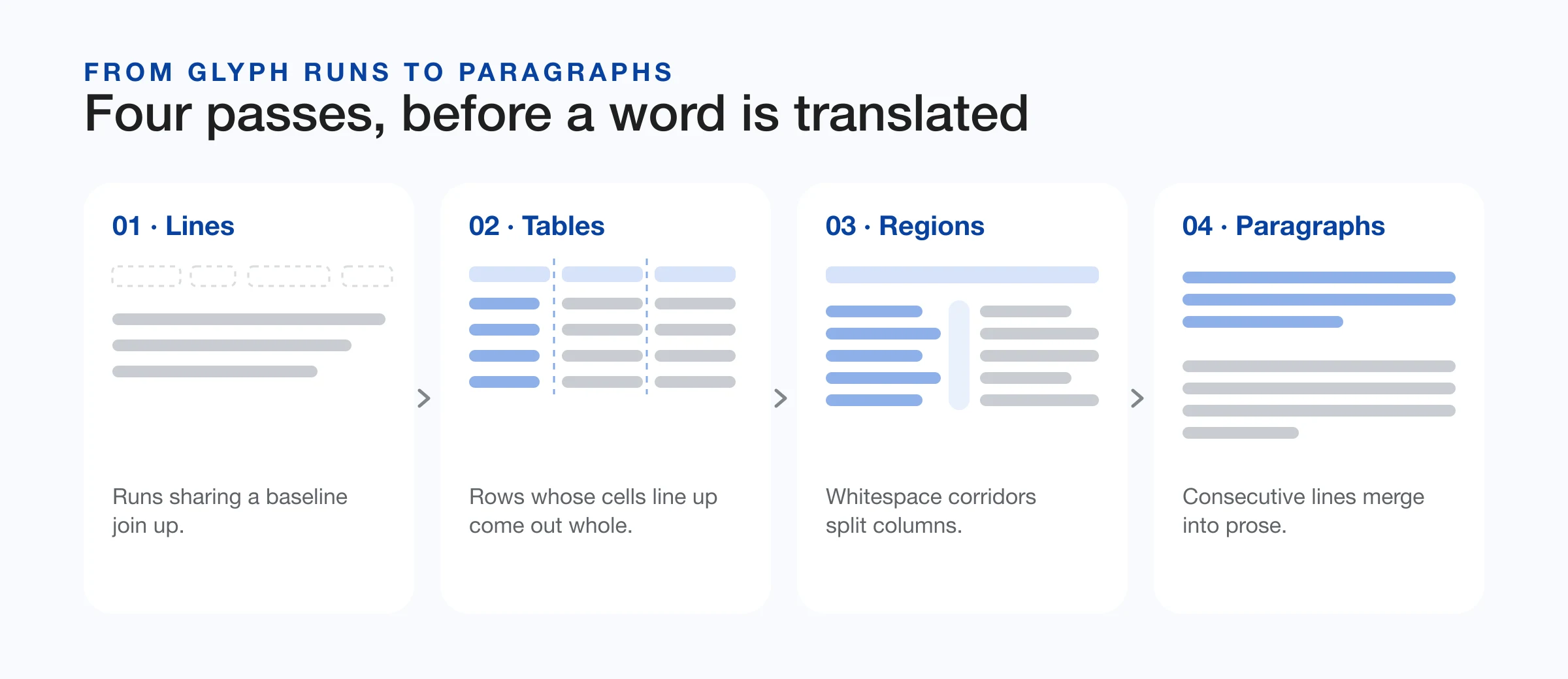
Pass 1: Baseline Aggregation & Margin Separation
Glyph runs whose vertical centers align within 50% of the local font height are grouped into continuous lines. Horizontal spacing determines word boundaries: gaps exceeding 20% of the font size insert whitespace tokens. Simultaneously, content residing within the upper and lower 6% margin bands is evaluated against the median page font size. Headers, footers, and pagination folios are isolated early so wide running text does not bridge column gutters during subsequent spatial analysis.
Pass 2: Table Extraction Before Column Slicing
Because table gutters mimic column corridors, tables must be extracted prior to column segmentation. The engine inspects consecutive line sets for aligned vertical dividers and bounding boxes. To prevent multi-column prose from being erroneously classified as a grid, the table validator enforces a strict numeric rule: a candidate block is only designated as a table if at least two cells contain numeric data or currency symbols. Each cell retains its coordinate box and row/column indices (row, col), enabling on-page spatial redrawing and structured Markdown table export (| Col 1 | Col 2 |).
Pass 3: Recursive XY-Cut Region Segmentation
The remaining prose lines are processed using a recursive XY-cut algorithm. The algorithm projects bounding box histograms horizontally and vertically, seeking continuous corridors of whitespace uncrossed by text. A vertical gap splits adjacent columns; a horizontal gap separates titles, abstracts, or figures spanning multiple columns. This hierarchical spatial tree reconstructs the natural human reading sequence.
Pass 4: Paragraph Assembly & De-hyphenation
Within each segmented region, adjacent lines merge into coherent paragraphs when font sizes match, line spacing remains uniform, and indentation remains consistent. Hyphenated words split across line breaks are automatically rejoined, yielding grammatically complete paragraphs for the translation model.
Non-Translatable Entity Protection
Technical and academic documents contain syntax elements that neural translation models frequently corrupt: LaTeX equations, citation identifiers (e.g., [12]), code variables, and URLs. Left unmasked, models translate variable names or alter citation numbering.
Prior to translation, a regex parser replaces these expressions with synthetic tokens (e.g., __PLACEHOLDER_0__). Following inference, the tokens are substituted back with their original source content. Because compact models occasionally drop synthetic tokens, an integrity audit inspects the output. If any placeholder is missing, the system automatically re-translates the sentence in unmasked mode to eliminate silent content loss.
Dual-Engine Translation & Watchdog Scheduling
To translate PDF content without network dependency, the execution layer employs a tiered local engine architecture:
- Tier 1 — Chrome Built-in AI (Translator API): In modern Chromium browsers (Chrome 131+), the engine leverages the native
window.translationAPI powered by device-level models (such as Gemini Nano). This delivers zero-download, zero-latency inference with negligible memory overhead. - Tier 2 — In-Browser Neural Fallback: If the built-in API is unavailable, unsupported, or restricted, the engine loads a quantized ONNX translation model (such as Opus-MT) via WebAssembly. The model weights (~100–114 MB per language pair) download once, cache in client IndexedDB, and operate entirely offline thereafter.
A key operational challenge in client-side AI is silent failure. Enterprise network filters, proxy blocks, or incomplete browser flags can cause capability promises to hang indefinitely without resolving or rejecting. To prevent interface lockup, the scheduler of the PDF translator enforces strict watchdog boundaries:
- Capability Probe Timeout: A 3-second hard ceiling on browser API detection. Lack of response immediately triggers the fallback model.
- Download & Inference Watchdogs: Model downloading monitors active progress events. If network activity stalls for 20 seconds, the engine aborts the request. Individual sentence translations carry dedicated ceilings to prevent infinite spinning.
Typographic Expansion & Auto-Fitting
Whenever you translate PDF documents into another language, the resulting text encounters physical typographic expansion. Language pairs differ substantially in character length and word density:
| Target Language | Average Length vs. English | Typographic Impact |
|---|---|---|
| Spanish | +20% to +25% | Paragraphs expand vertically; potential block overflow |
| French | +15% to +20% | Multi-line reflow; increased vertical footprint |
| German | +10% to +15% | Long compound words challenge narrow column widths |
| Russian (Cyrillic) | +10% to +15% | Broader glyph aspect ratios |
| Chinese (Simplified) | −40% to −50% | Substantial text contraction; compact vertical height |
When generating in-place overlays, the engine calculates the square-root ratio between source and target lengths: ratio = √(length_src / length_tgt). Using an iterative binary search over canvas line wraps, the font size scales downward (clamped at a minimum readable threshold) until the translated text block conforms precisely to the original bounding rectangle.
Reader Modes & Verification Interaction
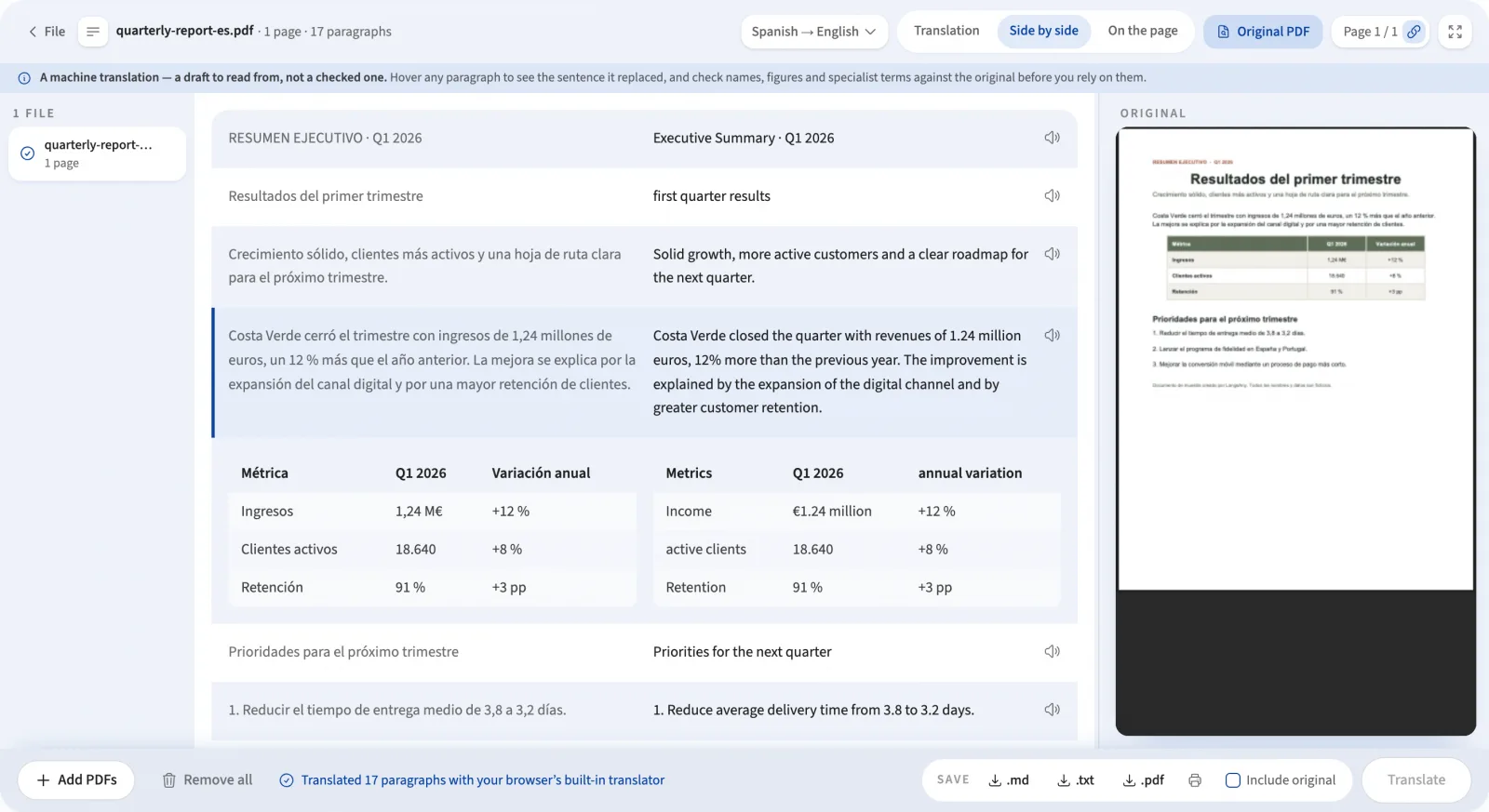
After you translate PDF records, reviewing PDF translation side by side with the source document is critical for high-stakes accuracy. An effective PDF translator interface must provide multiple perspectives paired with an integrated verification layer:
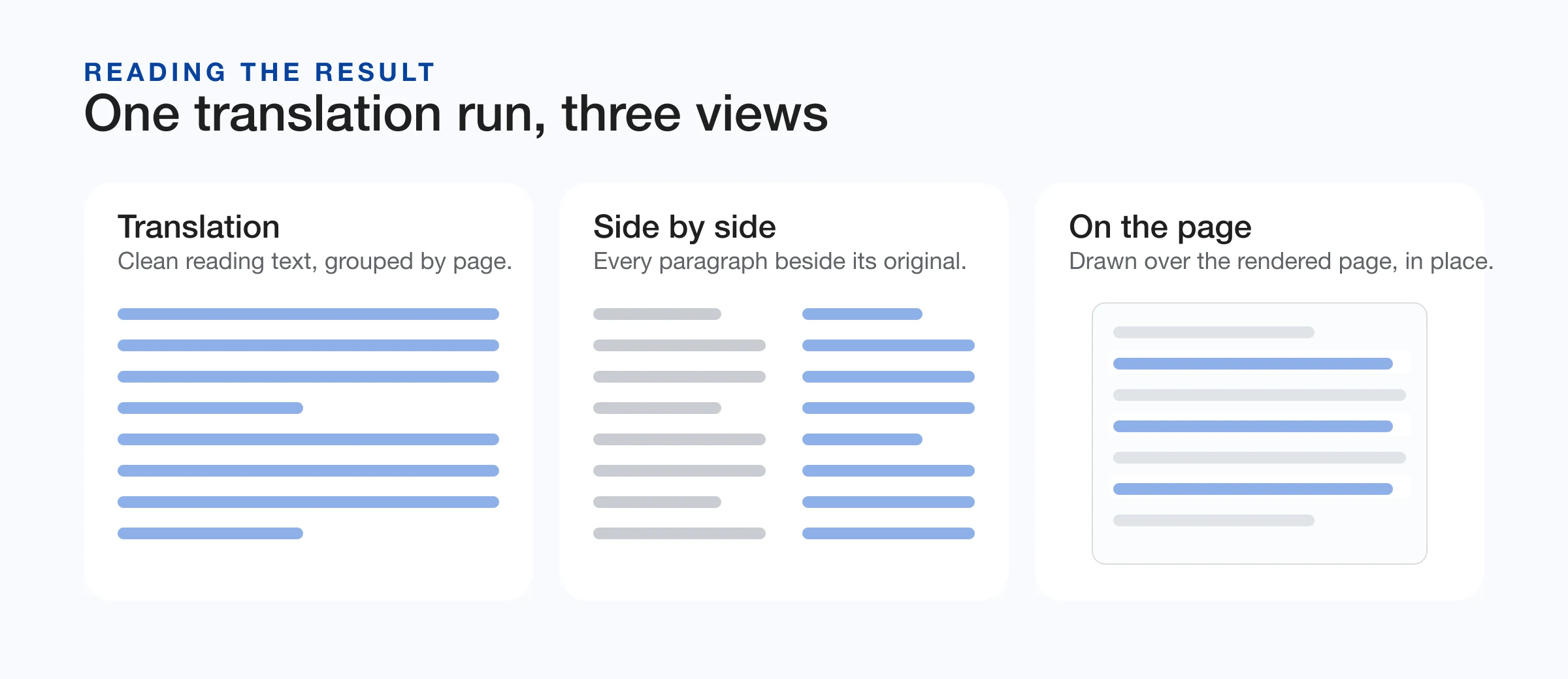
- On the Page: Renders translated text directly over original coordinates with whiteout patching. Hovering any translated paragraph toggles its opacity to zero, revealing the underlying source text in place without mouse-leave pointer flicker. A toolbar switch activates global “Peek under” to inspect all original text simultaneously.
- Side by Side: Displays source and target blocks in parallel columns. Hovering highlights the corresponding pair with a synchronizing indicator, facilitating rapid cross-examination of numerical values and technical terms.
- Translation: Presents reflowed, distraction-free reading prose grouped by page number, optimized for reading speed and document printing.
- Synchronized Source PDF Viewer: Embeds the original document in an adjacent pane powered by the browser's native PDF engine. A scroll observer dispatches debounced (500ms) page synchronizations (
#page=N) to keep both panes aligned without scroll stutter. - In-Place Target Language Switching: Users can change the target language directly within the reader interface. The document re-translates in place without requiring re-uploading, re-parsing, or manual queue resets.
Export Strategy: Canvas Composite vs. Font Subsetting
Once you translate PDF files, exporting the output presents a major architectural dilemma: writing true vector text objects requires embedding font files. A full CJK (Chinese, Japanese, Korean) font file spans 15–30 MB, creating unacceptable download latencies. While on-demand font subsetting via WebAssembly is technically viable, it introduces significant binary overhead and licensing constraints across international scripts.
The PDF export pipeline resolves this by rendering each translated page onto an HTML5 Canvas at scalable DPI (adaptive 1.25x to 2.0x based on page volume) and packaging the resulting composited bitmaps into a lightweight PDF 1.4 container. This approach delivers critical advantages:
- Universal Script Fidelity: Utilizes system fonts pre-installed on the client operating system, flawlessly rendering Arabic RTL, Cyrillic, and CJK glyphs without extra font downloads.
- Visual Parity: The exported PDF mirrors the exact layout and line breaks approved on screen.
- Provenance Metadata: Embeds ISO PDF document information entries (
Producer: LangsAny — on-device translation) to explicitly record machine translation origin.
For workflows requiring selectable or editable text, the engine provides structured Markdown (preserving tables and headings), plain text (.txt), and a batch ZIP archive containing all translations.
Operational Boundaries & Precautions
When utilizing an on-device PDF translator, several practical constraints must be noted:
- Machine Translation Draft Status: Client-side neural models serve as comprehension aids. Official legal contracts, clinical medical records, and regulatory filings require professional human review. Users should verify critical metrics and proper nouns using the side-by-side inspection view.
- Client Device Memory Limits: File size boundaries reflect client hardware capabilities rather than server quotas. The application queries the navigator Device Memory API and concurrency metrics, recommending safe limits (~40 MB on mobile, 200–300 MB on desktop workstations).
- Scanned Document Source Language Requirement: Because raw pixel bitmaps contain no character encodings for heuristic language identification, scanned PDFs require manual source language selection prior to OCR execution.
- Embedded Raster Graphics: Text flattened into photograph pixels inside vector PDFs cannot be extracted unless the entire file is processed as a scan.
- Strict Table Criteria: All-text tables lacking numeric figures are handled as regular paragraphs to prevent false-positive grid restructuring of multi-column prose.
By combining client-side geometry analysis, dual-engine AI scheduling, and interactive verification reading modes, in-browser PDF translation delivers private, high-fidelity document comprehension without exposing sensitive data to external cloud servers. Explore the tool directly on the PDF translator.
References & further reading
- 01PDF.js — Mozilla’s PDF renderermozilla.github.io/pdf.js/
- 02PDF 32000-1:2008 — the PDF specificationwww.iso.org/standard/51502.html
- 03Opus-MT: open translation models by Helsinki-NLPgithub.com/Helsinki-NLP/Opus-MT
- 04Chrome Translator API (built-in AI)developer.chrome.com/docs/ai/translator-api
- 05Device Memory API — MDN Web Docsdeveloper.mozilla.org/en-US/docs/Web/API/Device_Memory_API
- 06Tesseract.js — OCR in the browsertesseract.projectnaptha.com/
- 07Canvas API — MDN Web Docsdeveloper.mozilla.org/en-US/docs/Web/API/Canvas_API
Translate your PDF files
Private, browser-based PDF translation with layout reconstruction and on-device OCR.
Open the PDF translator