Running Whisper in a Browser: What It Actually Takes
“Runs in the browser” is easy to say about a text model and much harder to believe about speech recognition. Whisper (open-sourced by OpenAI) is the model behind most transcription products you have used, it is not small, and processing a minute of audio costs far more arithmetic than translating a minute of reading. So: can you really transcribe audio with no server, and what does it actually take?
Yes — and the honest numbers are better than the folklore suggests. Here is what is involved, measured rather than assumed.
Getting the audio into the right shape
Speech models do not take MP3 files. They take raw samples: mono, 32-bit float, at exactly 16 kHz, because that is what they were trained on. Feed them 44.1 kHz stereo and you get nonsense, not an error.
The browser handles all of it via the standard Web Audio API. decodeAudioData turns any format the browser can play into raw samples, an OfflineAudioContext resamples to 16 kHz using the browser's own resampler, and the channels are averaged to mono the way Whisper's own preprocessing does.
There is a pleasant surprise here. That same decoder will pull the audio track straight out of an MP4 or WebM video container. The received wisdom is that browser-based audio transcription of video needs WebCodecs or a 31 MB build of ffmpeg compiled to WebAssembly. For any format the browser can already play, it needs neither — a video file goes in and samples come out, with no demuxing step to write at all.
The setting that was worth seventeen times
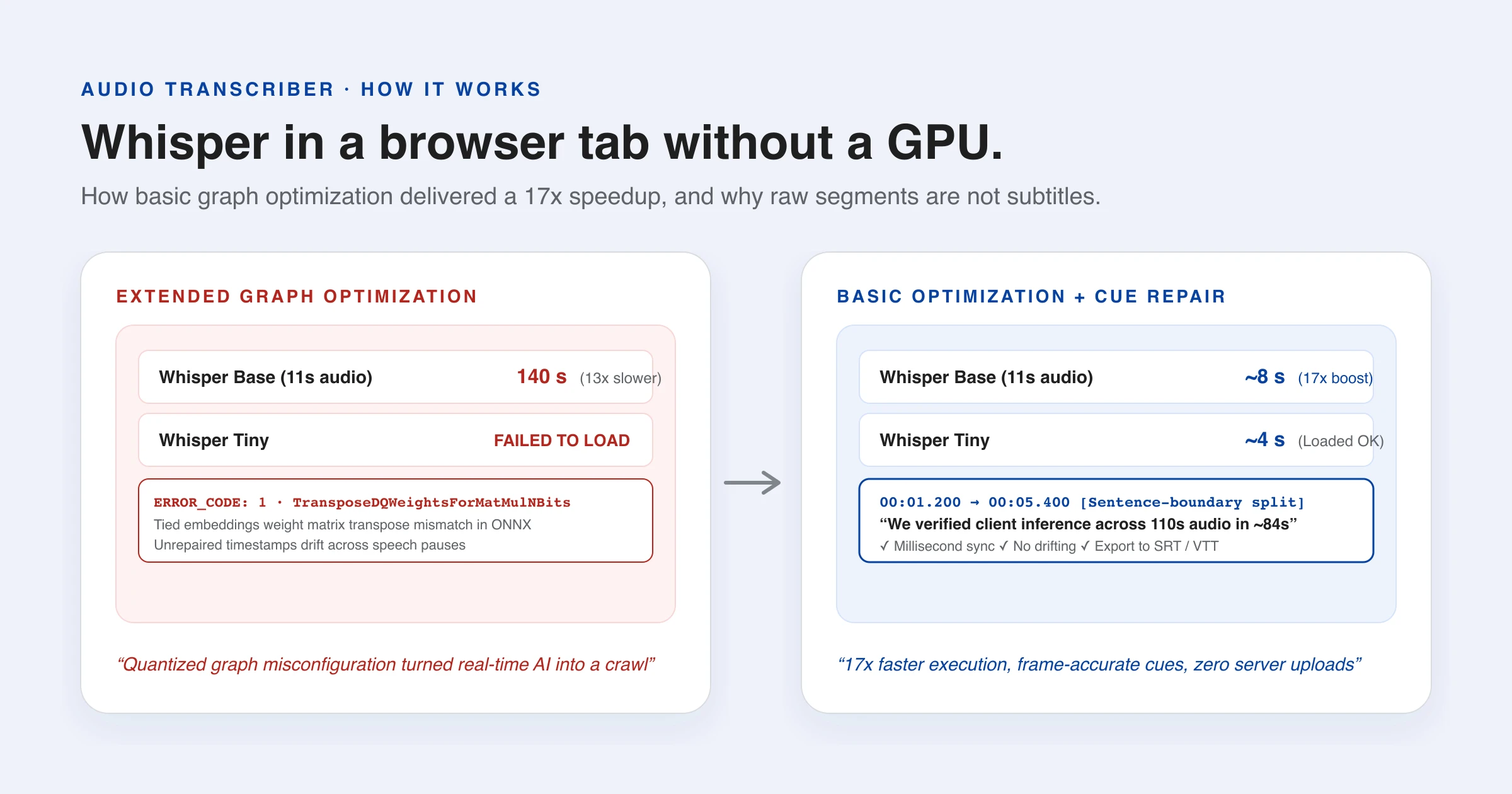
Now the part that actually decided whether this was viable. First run: Whisper base transcribing eleven seconds of speech on a six-core desktop CPU with no GPU. It took 140 seconds — about thirteen times slower than real time. That is the “you need a GPU for speech recognition in a browser” result everyone expects.
Then the smaller model, Whisper tiny, refused to load at all:
Can't create a session. ERROR_CODE: 1
qdq_actions.cc:137 TransposeDQWeightsForMatMulNBits
Missing required scale: model.decoder.embed_tokens.weight_merged_0_scale
That error is the clue. ONNX Runtime's extended graph optimiser tries to rewrite quantised matrix multiplications into a packed form, and it mishandles the weights when a model ties its encoder and decoder embeddings — as Whisper does, and as the Marian translation models on this site do. On tiny it fails outright. On base it silently produced a session that worked but ran appallingly.
The fix is one line: step the optimiser down from extended to basic. The result on the same machine, same audio, same model:
| Model | Before | After |
|---|---|---|
| Whisper base | 140 s | ~8 s |
| Whisper tiny | failed to load | ~4 s |
Seventeen times faster, from turning an optimisation off. On a longer sample — 110 seconds of speech — Whisper base took about 84 seconds, which is faster than real time on a CPU with no GPU at all. A ten-minute recording finishes in roughly eight minutes while you do something else.
The lesson generalises past this one bug: when a model is implausibly slow, suspect the runtime before the hardware. A GPU still helps, and WebGPU is used automatically where the browser offers it. But the premise that browser audio transcription is unusable without one turned out to be a misconfiguration wearing a hardware costume.
Why model segments are not subtitles
Whisper returns timed segments, and it is tempting to write them straight to an SRT. Do that and you get a file that flashes two-word cues and then parks a forty-second paragraph on screen, because the segments follow how the person spoke rather than how anyone reads.
Three repairs turn one into the other. Timings get fixed: Whisper drifts, so a segment can start before the previous one ended, and the last segment often has no end time at all — that one is closed with the real clip length rather than a guess. Long segments get split at sentence boundaries, with their duration shared out by character count, so each piece is short enough to read in the time it is on screen. Fragments get merged into their neighbour, because “Well,” on its own for six tenths of a second is not a subtitle.
Once repaired, the transcript is structurally identical to a parsed .srt — which means everything already built for subtitle files works on it untouched: sentence rejoining, translation, bilingual rendering, SRT and WebVTT export. The transcript never needed its own pipeline; it needed to be shaped like one that already existed.
Transcribe first, then translate
Whisper can translate speech directly, but only ever into English. As a general audio translator that is fatal: Spanish audio to Chinese, Japanese audio to German, Arabic audio to French — none of them are one-step operations.
Running the stages separately removes the ceiling. Transcribe in whatever language was spoken, then send that text through an ordinary translation model, and every pair it supports becomes available. You also get to see the transcript, which matters more than it sounds: when a translated line reads strangely, the original tells you at a glance whether the model mistranslated the words or simply misheard them.
What it still gets wrong
Accuracy tracks audio quality closely. One clear speaker into a decent microphone transcribes very well; two people talking over each other, a noisy room, music under speech or a phone recording all cost you words. Whisper does not identify speakers, so an interview comes back as continuous text rather than a dialogue.
And there is one failure mode worth knowing about specifically: during long silences or unintelligible passages, Whisper sometimes produces a fluent, confident sentence that was never spoken. It is grammatical, plausible, and entirely invented. Any transcript worth relying on gets skimmed against the audio first — a local transcript makes that easy, since the file never left the machine to begin with.
Why doing it locally is the point
Audio carries more than its words. A recording identifies the speaker by their voice, captures whatever else was in the room, and usually runs before and after the part you cared about. Handing one to a transcription service means handing over all of it, under terms that generally permit retention and sometimes training.
For a journalist with a source, a clinician with a patient, or a researcher whose consent form says the data stays local, that is not a trade-off to weigh — it is a rule. When audio transcription runs in the tab, the question does not arise: there is no upload endpoint to trust.
You can try it on the transcriber or turn a video into subtitles on the video subtitle translator — with DevTools open, if you like. The model comes down once. Your recording never goes up.
References & further reading
- 01Whisper — OpenAI researchopenai.com/research/whisper
- 02Transformers.js — run AI models in the browserhuggingface.co/docs/transformers.js
- 03ONNX Runtime Web — graph optimizationsonnxruntime.ai/docs/performance/model-optimizations/graph-optimizations.html
- 04Web Audio API — MDN Web Docsdeveloper.mozilla.org/en-US/docs/Web/API/Web_Audio_API
- 05WebGPU — MDN Web Docsdeveloper.mozilla.org/en-US/docs/Web/API/WebGPU_API
Transcribe audio in your browser
Run Whisper speech recognition directly on your device — accurate, private, and server-free.
Open the transcriber